Waybills & Shipments
Waybills & Shipments
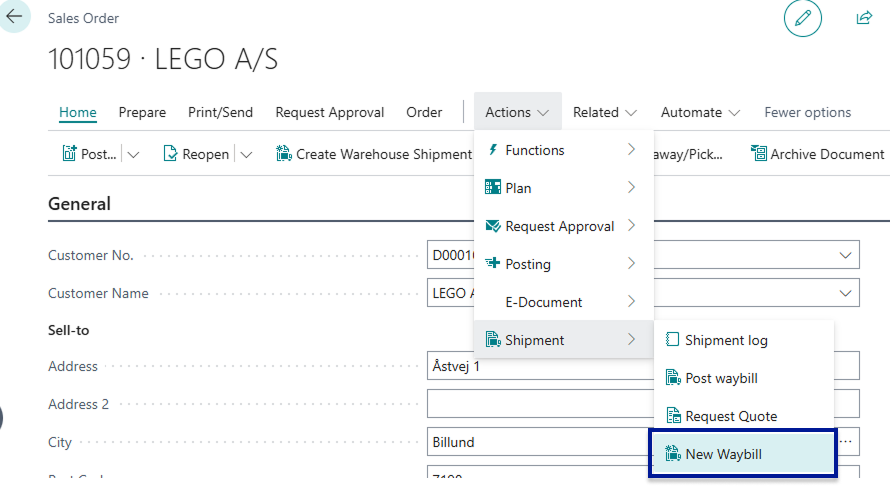
Section titled “Waybills & Shipments”Each of the Shipment Connectors utilises a Waybill to store the information that is forwarded to the Shipping Agent/Carrier. The relationship between Waybills and orders are 1 to 1. For each order one waybill is created. The only exception is for documents that existed prior to the installation of the Shipment Connector - For these pre-existing documents users will have to manually create a Waybill which can be done by opening the given document and navigating to the following Actions > Shipment > New Waybill.
It is also on the Waybill that the parcel information which is forwarded to the shipping agent is entered. The Waybill consists of a Shipping Agent/Carrier, an associated Shipping Agent Service, order reference no. and optionally a pick-up point ID, and receiver description.
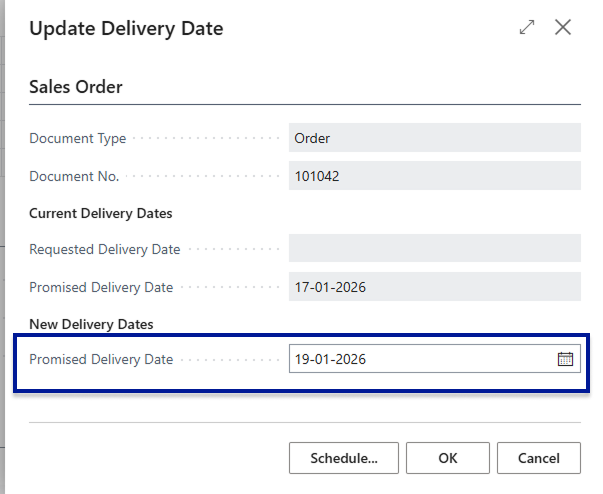
We also have two sections for Pick-up information and Ship-to information where you can enter when you want you shipments to be picked up and at which time as well, along with when the desired delivery time and date of the shipment. If you are Shipping from Sales Orders then you can use the standard Business Central fields Requested and promised Delivery (Primised Delivery Date > Requested Delivery Date) date to assign a delivery date for the shipment.
For warehouse shipments we have added a field called delivery date under the Shipment section where you can change the delivery date.

By default we aim to utilise as much as Standard Business Central as possible so if you have setup a standard shipping agent and shipping agent service on your Customers In Business Central these fields are filled out in the Waybill Header automatically - it is essential that a shipping agent and a shipping agent service is specified and set up properly on the waybill that is being handled otherwise it is not possible to forward the relevant information to the Multi-carrier platform and thereby the carrier itself.
