Shipping Agent & Shipping Service Setup
Shipping Agent & Shipping Service Setup
Section titled “Shipping Agent & Shipping Service Setup”When you have downloaded your Shipping Agent & Shipping Agent Service data into Business Central they will be given an ID in the Code field which is standard to Business Central, this field can always be changed without fear of breaking the connection between BC data and Multi-Carrier platform. The same goes for the code of the Shipping Agent Service
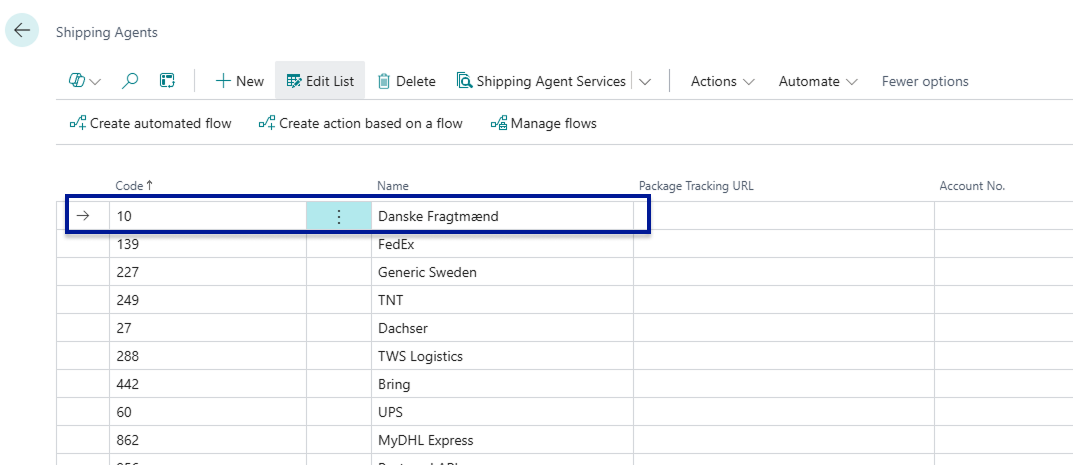
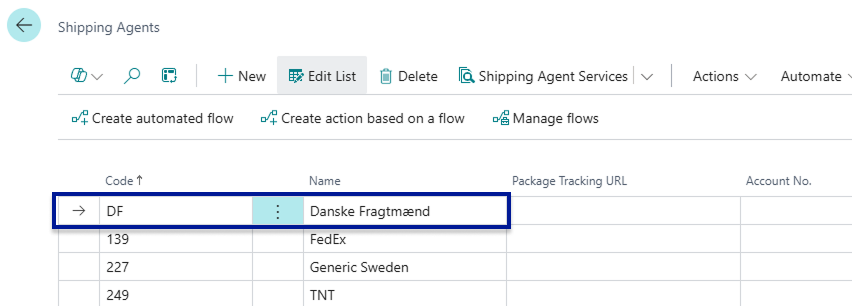
An example of this could be that when downloaded from Multi-Carrier Platform into Business Central a carrier such as Danske Fragtmænd may get a Code of 10. However, we can change this as we see fit for instance into DF - Remember the Code field only holds 10 characters.
Before:
After:
Default Shipping Agent and Service
Section titled “Default Shipping Agent and Service”Each Shipping Agent in Business Central has a Default checkbox, and each Shipping Agent Service also has its own Default checkbox. These settings control which carrier and service are automatically pre-selected when a new waybill is created.
When a new waybill is created for a document, the system reads the Shipping Agent Code from the source document (Sales Order, Transfer Order, etc.). If the document already has a Shipping Agent Code set, that agent is used on the waybill. If no specific Shipping Agent Service is set on the document, the system automatically selects the service that is marked as Default for that agent — so users do not have to manually pick a service every time.
- The Default checkbox on a Shipping Agent marks that carrier as the primary carrier to use when no other agent is specified.
- The Default checkbox on a Shipping Agent Service marks that service as the fallback service for its parent agent when no service is specified on the document.
- Only one Shipping Agent should be marked as Default, and only one Service per agent should be marked as Default.
Waybill Carrier Selection
Section titled “Waybill Carrier Selection”On the Waybill Header, there is a Waybill Type field that controls how the Shipping Agent and Shipping Agent Service are determined for that specific waybill. This field has two options:
- Default (Same as Document) — The Shipping Agent and Shipping Agent Service on the waybill are locked to whatever is set on the source document. The user cannot change the carrier or service directly on the waybill itself; they are inherited from the document.
- Custom Shipping Agent — The user can freely select any Shipping Agent and Shipping Agent Service on the waybill, independent of what is set on the source document.
By default, new waybills use Default (Same as Document), which means the carrier follows the document’s setup automatically.
Use Custom Shipping Agent when you need to ship a specific order with a different carrier than the one set on the source document — for example, when an urgent order requires express delivery with a different carrier than the one normally assigned to that customer or order type.
Shipment Posting Type
Section titled “Shipment Posting Type”The Shipment Posting Type field is found on the Shipping Agent Services list page and controls how the shipment booking is submitted to the carrier. It is a per-service setting, so you can configure different posting types for different services.
The field has two options:
- Default — the standard posting behaviour. The carrier label is booked as a regular shipment. This is the correct choice for the vast majority of services.
- Order Shipment — posts the shipment as an order-type booking. Some carriers distinguish between order-based bookings and standard label-based bookings, and require the order type for certain services or workflows.
When to use Order Shipment: only when your carrier specifically requires order-based bookings rather than standard label bookings. This is carrier-specific behaviour — if you are unsure which type to use, check your carrier’s documentation or contact the carrier directly.
Loading Meter Factor
Section titled “Loading Meter Factor”Loading metres (LDM) are a unit used by many carriers — particularly in Scandinavian road freight and pallet shipping — to calculate freight charges based on the floor space a shipment occupies in a vehicle, rather than purely by weight or volume.
The Loading Meter Factor field on the Shipping Agent Services list page lets you configure automatic loading metre calculation for a service. When a value is entered here, the system automatically calculates the Loading Meter value on each Waybill Line using the following formula:
Loading Meter = Length × Width ÷ 10,000 ÷ Factor
The calculated value is then forwarded to the carrier as part of the shipment data and used for freight calculation.
Typical value: For a standard Euro pallet, the Loading Meter Factor is 2.4. Set this value on the Shipping Agent Service if your carrier charges based on loading metres for pallet shipments.