Dangerous Goods
Try working with Dangerous Goods in a trial setup
Section titled “Try working with Dangerous Goods in a trial setup”Use the 30 days free trial period to experience how Dangerous Goods, will ease your Management of Dangerous Goods data.
The trial will be without any restrictions and can be converted to production at any times.
Just a few steps to complete
Section titled “Just a few steps to complete”-
Open Microsoft Dynamics 365 Business Central.
-
Follow the installation guide.
- Create a test setup.
- IMPORTANT Download ADR class list, transport categories, Translations (if needed) & some test UN number data.
NB: DG Office & nShift Ship
Section titled “NB: DG Office & nShift Ship”In order to use Dangerous Goods with nShift Ship it is required by them that you have an active subscription with DG Office read more here: DG Office integration in Ship.
The following is required:
- Core Module
- API / Webservices module
- Transport / Road module
- Own articles module
See image below for reference of required modules
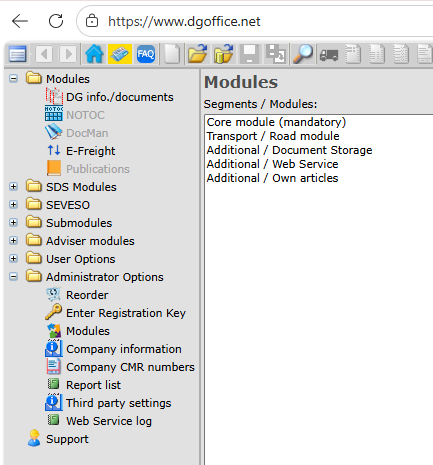
When these requirements are fulfilled you should do the following:
- Create all relevant UN Numbers in Business Central on the UN number list see the guide for this here.
- Create the same lines in DG office under own articles, this is essential for the integration to work propery - see image below for reference:
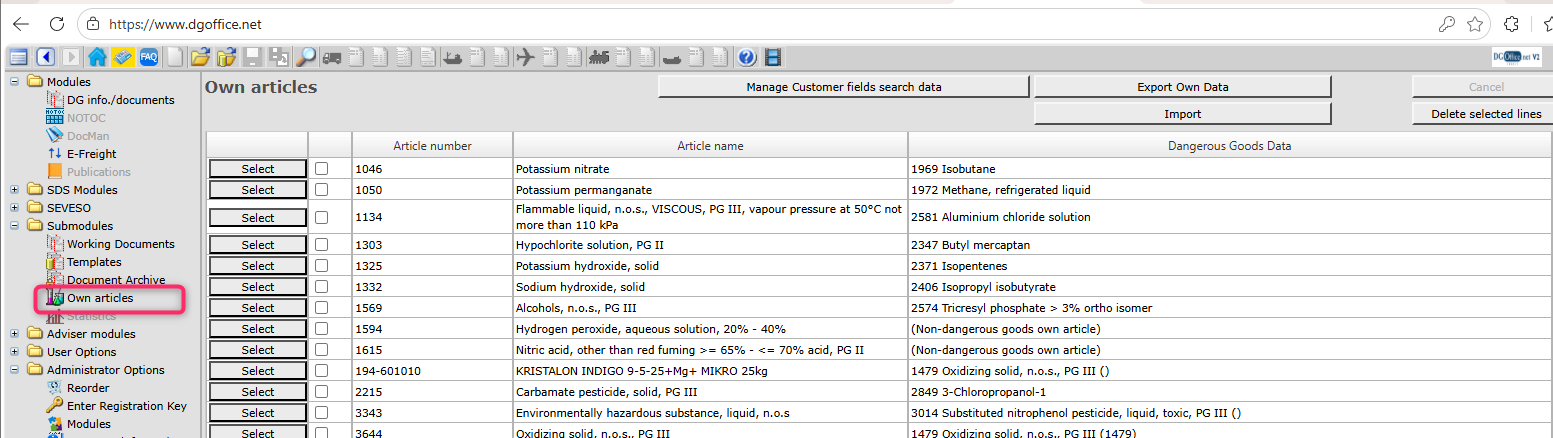
- Add the UN numbers to their relevant items in Buisness Central - more info about this in the guide above.
We are working on a way to easier import the article/UN number data from DG office - We expect to have this out sometime this year.