Release note - November 2025
New Shipment Connector version 4.11.5.0
Section titled “New Shipment Connector version 4.11.5.0”This november release features quite extensive additions to the Shipment Connector, along with a few quality of life additions and hotfixes. Read the comprehensive list of changes below. If there are any questions please direct them to support@xtensionit.com.
Features
Section titled “Features”1.1. Added a Qty-to-ship field on the Waybill Lines (all MCP’s except Webshipper)
Section titled “1.1. Added a Qty-to-ship field on the Waybill Lines (all MCP’s except Webshipper)”A feature that was previously only available (to a certain extend) in nShift Ship is now fully supported in Shipmondo & Transsmart as well. It is now possible to add a qty-to ship for a specific Waybill line. For instance instead of inserting 10 quantity into the outstanding packages field on the waybill header you can simply go to your waybill line insert the package type e.g. a Euro Pallet (PL1) and insert 10 in the qty. to ship field. This would then imply that you are sending 10 Euro Pallets instead of having 10 seperate Waybill lines.

1.2. Added Total weight & Colli weight fields to the Waybill Lines (all MCP’s except Webshipper)
Section titled “1.2. Added Total weight & Colli weight fields to the Waybill Lines (all MCP’s except Webshipper)”The new Qty-to-ship field is accompanied by the additions of a Total weight & Colli weight field. This also introduces the new weight distribution system where you can specify whether you would like the changes of weight to apply to the Total weight or the Colli Weight.
This can be set up on our Shipment Settings Page under the segment Shipment Measurements.

When you have Split Weight on Colli is enabled if you increase the qty. to ship field the Total Weight will increase by what each Colli weighs. For instance. if you have a colli weight on the waybill line of 20 kgs. and increase the qty. to ship to 2 the total weight will become 40kg.
When Split Weight on Total weight is enabled the opposite occurs so every time you change the qty. to ship field the colli Weight will change depending on the Total Weight. if you have a Total weight on the waybill line of 40 kgs. and increase the qty. to ship to 2 the Colli weight will become 20kg.
1.3. Added support for Requested Delivery Date & Delivery Time.
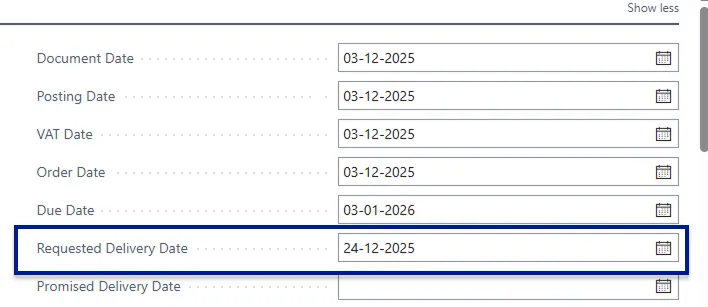
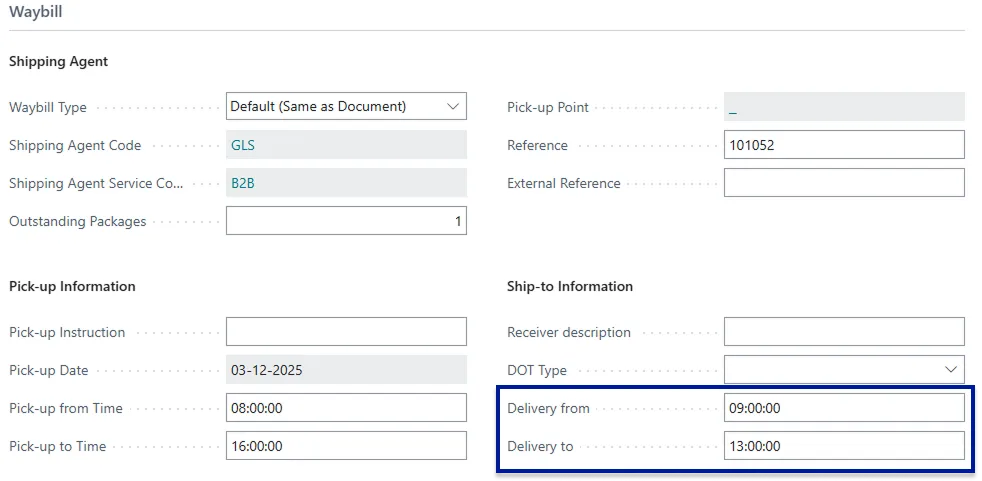
Section titled “1.3. Added support for Requested Delivery Date & Delivery Time.”We have added two new fields to the Waybill Header Delivery From time & Delivery To Time as well as utilizing the Requested Delivery Date field on the Sales Order Header. This enables you to specify a time and date for which you would like the carrier to deliver the shipment. DOT-type shipments with Danske Fragtmænd is still supported and simply utilises the Delivery-From field and functions as previously with only the Delivery-from field being mandatory in the case of DOT Shipments.
Delivery Date for the carrier is taken from Business Central Standard Field Requested Delivery Date.
Delivery from time and Delivery to time comes from the Waybill Header
Hotfixes
Section titled “Hotfixes”1.1. Fixed a bug on Transfer Orders
Section titled “1.1. Fixed a bug on Transfer Orders”When shipping from a transfer order with certain carriers that have validation on mobile phone no. you could encounter an issue on a missing mobile no. We found out that Microsoft had only added the Phone no 2. on the table on the location card and not on the actual page. And on transfer orders this is used for mobile phone no. since there isn’t another field for that.
1.2. Added further support for Custom Shipping Agents without Concept ID (nShift Ship)
Section titled “1.2. Added further support for Custom Shipping Agents without Concept ID (nShift Ship)”When nShift sets up customers custom carriers they do not attribute a Concept ID to them and prior to BC26.5 we had support in place to compensate for this, for some carriers this imposed an issue when we downloaded the carrier data to BC this has now been addressed.
1.3. Added commit for shipment data during posting (Auto-Post shipment enabled in settings)
Section titled “1.3. Added commit for shipment data during posting (Auto-Post shipment enabled in settings)”Users experienced particularly on Shipmondo that if they encountered a Business Central Posting Error that the Waybill would still be posted and a label printed but the lines would not be reserved. We have added a commit to the data to ensure that if the waybill is posted the line will also be reserved. This is due for further iteration in the next version where we will attempt to move our EventSubscriber on the Business Central Posting further down the process to enable a roll back of data so the Waybill is not posted if an error occurs in the posting.